Opera
Opera is a free web browser for Windows from Opera Software. The stable release is 136.0.6008.22, published on 17 September 2026.
133.1 MB

Google Icon is a tiny free browser extension by Sunsean that shows each website's favicon next to its Google search result.
Average 0.0 · ratings: 0
Thank you! Your rating is saved; you can change it. Could not save the rating. Please try again later. Too many ratings from your network today. Please try again tomorrow. The average appears after 5 ratings.
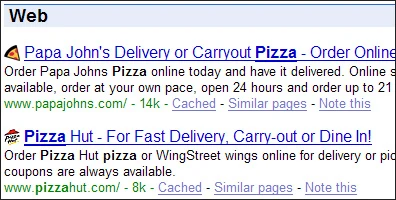
Google Icon 1.9 is a tiny free browser extension by Sunsean that adds each site's favicon next to its result on Google search pages. You can download Google Icon from the author's page; it is one of the smallest add-ons in our listings and does just one thing.
A favicon is the small logo a website shows in the browser tab. Search results used to show only titles and links, which made a long list look uniform and hard to scan. Google Icon places the favicon of each site in front of its result, if the site has one, so you can spot familiar sources at a glance: a documentation site, a forum you trust or a shop you use. The idea is simple visual help rather than a new feature, and the author describes it exactly that way, as a way to make results easier to recognise and a little more lively. The extension does not change the ranking, does not add results and does not need an account. Since Google has shown icons in results itself for some time, the effect in a current browser may be small or duplicate what is already there, so the add-on is mostly of interest to people using older browsers or older layouts.
The author does not list requirements in our data, and old extensions may not install in current browsers at all. Install it only from the author's page. Every extension that works on search pages can see what you search for, so remove add-ons you no longer use.
Make sure the extension is enabled in the browser’s add-ons list and reload the results page. Google changes its result layout from time to time, and an extension written for an older layout can stop finding the right place to add icons. In that case there is nothing to fix on your side; simply remove it.
Google Icon is free.
Browser tools on our site include Google Translate for page translation.
Opera is a free web browser for Windows from Opera Software. The stable release is 136.0.6008.22, published on 17 September 2026.

UC Browser for Windows is the desktop version of the web browser from UCWeb, a Chinese mobile internet company.
Google Translate is Google's multilingual machine translation service, used on Windows through the website and a browser extension.

Microsoft Edge is Microsoft's web browser, preinstalled on current Windows versions and available as a free download for reinstalling or updating.

Mozilla Firefox is a free and open-source web browser developed by Mozilla, available for Windows, macOS, Linux, Android and iOS.

Google Chrome is the free web browser from Google. The stable Windows release is 154.0.8037.58, out since 22 September 2026.

Cent Browser is a free Chromium-based browser for Windows from Cent Studio that adds mouse gestures, tab tweaks and other power-user options.